
1. What You Can Do
With this feature, you can:
- Mark documents as required for training
- Define who must be trained using roles, teams, or rules
- Set required coverage (%) for completion
- Define training validity (once-off or recurring)
- Track training progress across documents and programs
- Identify training gaps at user level
- View data in list and matrix views
- Access audit-ready training history
2. Setting Up Training Requirements on Document Level
To set them up:
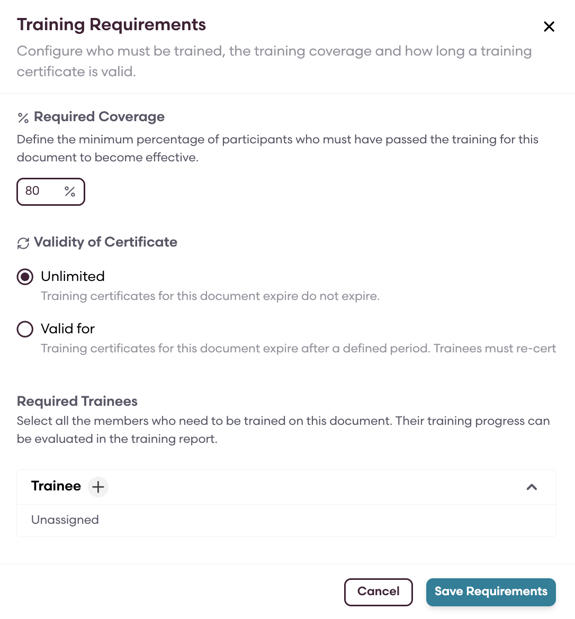
- Enable Training Required on a document
- Select the required trainees (roles, teams, etc.)
- Define required coverage (default is 100%)
- Set training validity:
3. Programs and Events
Training programs group related training, while events are where training happens. We have enhanced the feature such that programs and events now support more flexible configuration.
- Materials are classified as:
- Required Material (counts toward completion)
- Supporting Material (informational only)
- Only Qualification Material impacts training status
Event editing depends on status:
- Draft → fully editable
- In progress → only trainers and trainees can be changed
- Completed → read-only
You can add or remove participants during an ongoing event, but users who have already completed training cannot be removed.
4. Training Progress
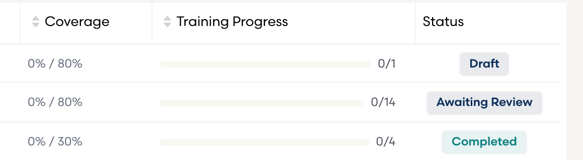
Training Progress provides a high-level view of compliance.
It shows:
- Completion percentage (e.g. 80%)
- Completion ratio (e.g. 8/10 trained)
- Effective date
- Status
This is available for both:
- Documents
- Programs
5. Gap Analysis
Gap Analysis helps you understand who is missing training and why.
You can view this from two perspectives:
- Document-based → who hasn’t completed training of a specific document
- Program-based → who hasn’t completed a program
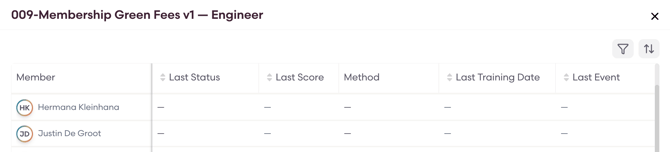
For each user, you can see:
- Last training status
- Last event
- Next scheduled training
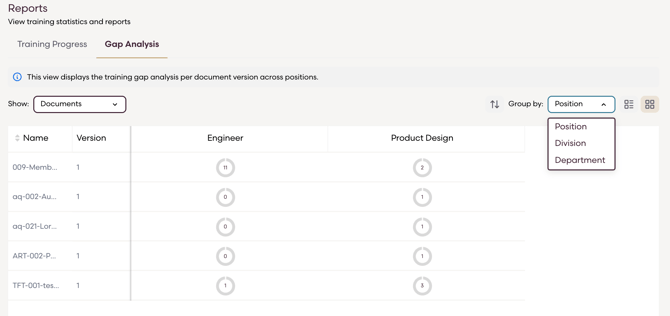
The gap analysis also has a Matrix View to provides a quick, visual overview of training status across teams.
Tips and Best Practices
- Use Required Material carefully, as it determines completion
- Review Gap Analysis regularly to catch missing training early
- Finalize training settings before documents become effective, as they cannot be changed afterward