
Template References in Records
Template References allow you to link templates (e.g. CAPA Template) to a document (e.g. CAPA SOP) or activity record. When a referenced template is updated, affected records are marked as ''outdated'' and responsible users are notified. This helps maintain visibility over template changes and ensures documents referencing them can be reviewed if needed.
1. What You Can Do With Template References
With Template References, you can:
-
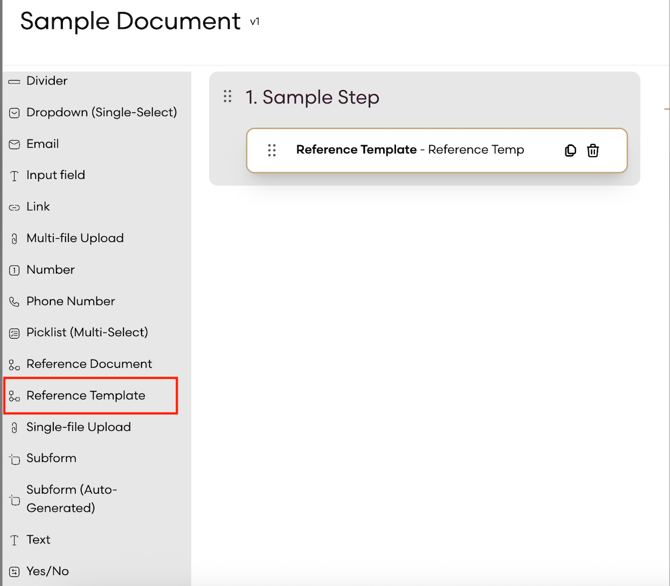
Add the Reference Templates form field within the Template Builder
-
Select referenced templates when filling records
-
When a template is updated, users see that documents would be affected and marked ''outdated''
-
View template references in the Associations & References tab of the relevant record
-
See template references in PDF and Excel exports
2. Setting Up Template References
2.1 Add a Template Reference in the Template Builder
-
Open the Template Builder
-
Add the Template Reference question type to your form
-
Save the template
2.2 Select Template Answers in Records
-
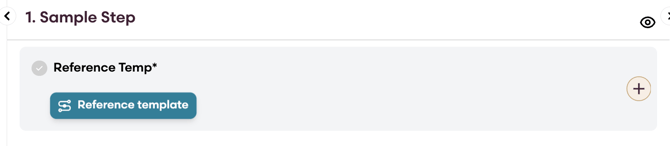
When completing a form, select an answer for the reference template field
-
This creates the link between the record and the referenced template
2.3 Updating a Referenced Template
-
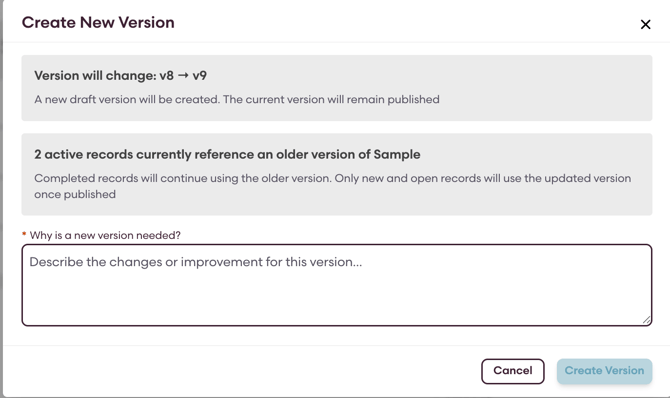
When updating a template referenced by records, you see a warning modal so that you can review the impact before publishing the update.
4. Tips and Best Practices
-
Review referenced records before updating a template to understand the impact.
-
Verify template references in the Associations & References tab to see connections across documents.
-
Test template references in draft records before applying them to existing documents.