
AI Text Comparison
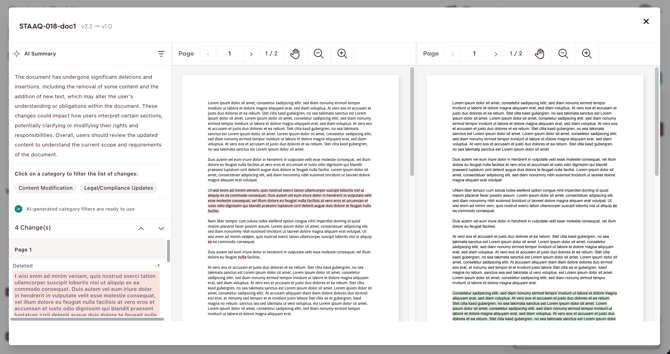
AI Text Comparison lets you compare any two PDF versions of the same Activity or Document and see exactly what changed in the text. Instead of checking versions manually, you get an AI-generated summary, a categorized list of changes, and a side-by-side view; a faster, more reliable aid when reviewing or approving a new version.
What You Can Do With AI Text Comparison
- Compare any two versions of the same Activity or Document, including rejected or replaced ones.
- Read an AI-generated summary of what changed.
- Step through a categorized list of changes and jump straight to each one, highlighted in both PDFs.
- View both versions side by side.
How AI Text Comparison Works
A comparison runs on demand, it is never triggered automatically. You pick a starting version (Version A, the one you start from) and a comparison target (Version B); Playbook then analyzes the text and opens an interactive results view. If you compare the current draft and it does not have a PDF yet, Playbook prepares one first. You can only select versions you have access to, and a version cannot be compared with itself.
Run a Comparison
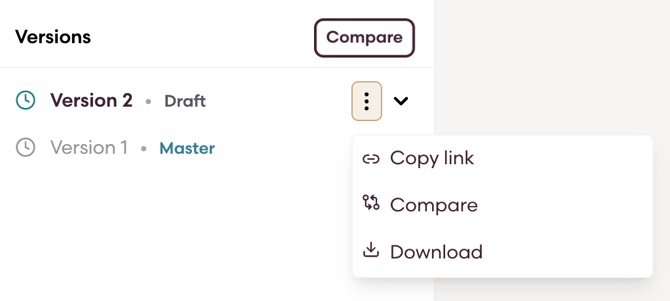
- Open the Activity or Document and go to its Versions area.
- Start the comparison in one of two ways:
- Click the overall Compare button, then select PDF A and PDF B; or
- Open the kebab menu on a specific version, that version is pre-selected as A, then select B.
- Wait while the comparison processes; a loading state is shown.
- Review the result: read the AI summary, click any change to highlight it in both PDFs, use the previous/next controls to move between changes, and toggle synchronized scrolling as needed.
Contact our Customer Support or Sales team if you would like to enable this feature for your organization.