
Dynamic Data Improvements
Dynamic Data has been updated to improve overall reliability and usability across supported areas of the product.
With these improvements, users may notice:
-
Smoother interactions across views and workflows
-
Improved overall stability when data updates or changes
This does not change the way you work with dynamic data.
New viewer for PDFs, images, and Office files
With the PDF viewer, you can:
-
View PDFs, images, and Microsoft Office files directly in Playbook without having to download them.
-
Navigate more intuitively within files (zoom, scroll, browse, etc.).
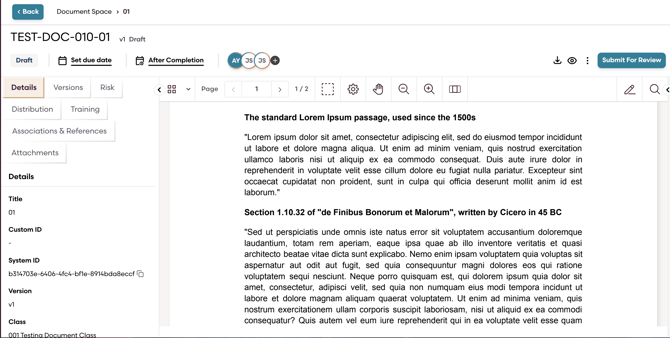
No license upgrade is required to use the viewer.
PDF Annotation (Paid Feature)
PDF annotation allows users to add markup and feedback directly to PDF documents. This feature is optional and can be enabled upon request.
Once enabled, users can:
-
Upload new PDFs and annotate them
-
Add highlights, comments, drawings, shapes, and text annotations
- Edit or remove annotations as needed (only in draft status)
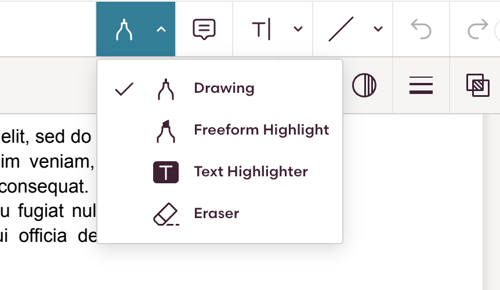
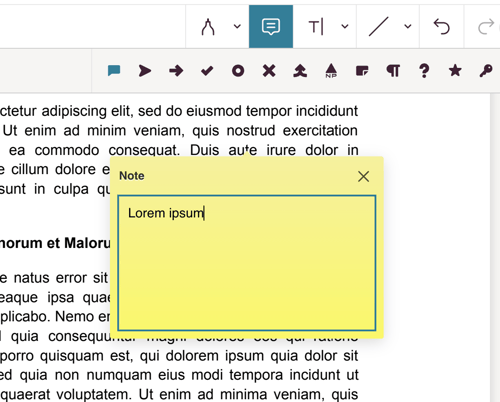
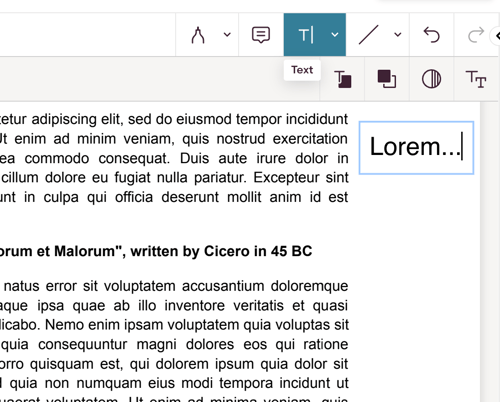
The annotation experience follows familiar patterns similar to common PDF annotation tools, making it easy to pick up and use.
Where to Find PDF Annotations?
When annotations are enabled in your organisation:
- Annotation tools appear automatically within the new viewer
-
Changes are saved directly to the document
How to Get Access to PDF Annotation?
If you need PDF annotations for your workflow, please contact your Customer Success Manager (CSM).